☰ Menu

Y7 - SU2.4 - Fun With Classes

⏱️ Do It Now

Create a OneNote Page and copy this into the title:

Lesson 4 - Summer Term 2 - Fun With Classes


Copy this into a OneNote Page and complete it

📝 Do It Now

Answer each of the following:

(1) What HTML element do we use for links?


(2) What does src mean and what tag does it go in?


(3) What does href mean and what tag does it go in?


🎯 Learning Objectives


  • LO1: We will learn what a CSS class is
  • LO2: We will be able to apply a CSS class to a selection of elements on a webpage
  • LO3: We will be able to create styles to be applied to all elements within a particular class

🔎 Fun With CSS Classes

Click THIS LINK for today's project

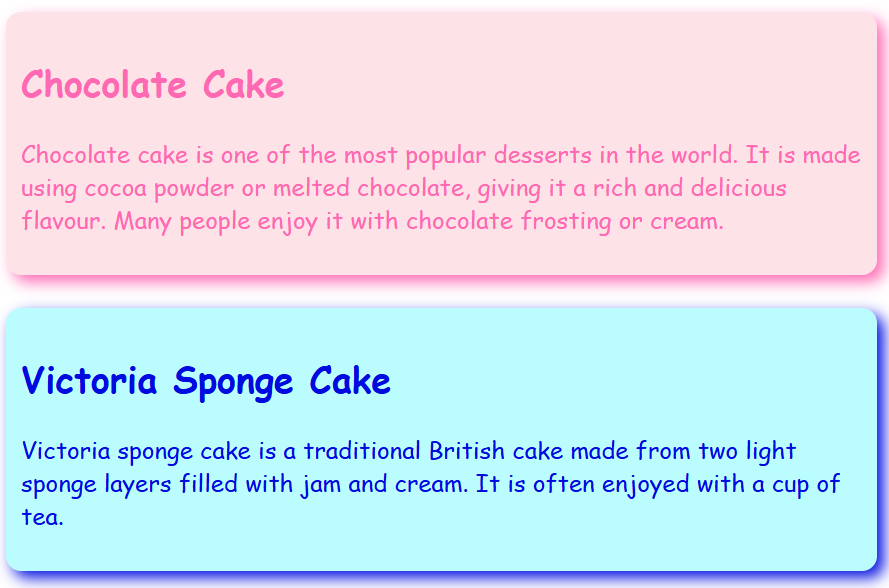
Your teacher will show you how different CSS classes can be used to control groups of elements on a webpage


Alternatively...

🎥 Watch THIS VIDEO to see the same demonstration

📝 Independent Activity

Copy this into your OneNote Page and complete it

📝 Independent Activity - Fun With Classes

Instruction:

  1. Go to index.html and take a screenshot of one of the DIVs on your webpage (including the h2 and p elements within it.

  2. Go to styles.css and take a screenshot of the class that controls the element you just took a screenshot of.

  3. Take a screenshot of the preview (the blue or pink textbox)

  4. Explain how the individual CSS styles in the class control the way the element looks.

  5. Identify why classes are a useful tool for web developers to work with


  6. Continue working on your own website project - see if you can apply any of the skills you have learned today.